Tolmo has three security agents. Each agent has one job. The agents send findings to each other:

How the agents work together
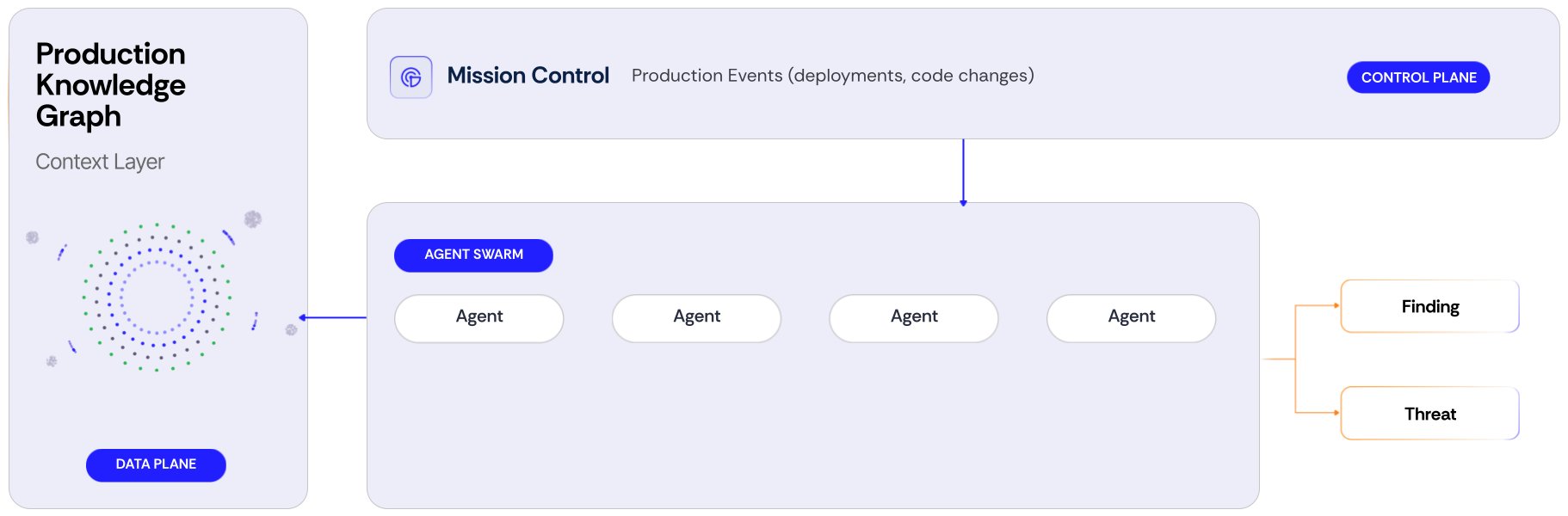
Platform diagram. The production knowledge graph is the data plane. Mission Control is the control plane and receives production events such as deployments and code changes. Mission Control sends work to a group of agents. The agents read the knowledge graph and produce findings and threats.

The Tolmo platform. Mission Control receives production events and sends work to the agents. The agents read the production knowledge graph and produce findings.

A finding is one record. This is true for all agents. For example, Blue can prove a Wiz alert, or Green can recheck a Red finding. In both cases, the runs attach to the same finding. You do not have to merge duplicate findings from different agents. All agents also use the same scope. The scope contains the authorized domains, the test accounts, and the instructions. When you revoke a domain, the next run of each agent does not test it. See Define scope. A finding gets the validated status only after an agent reproduces it. The agent also keeps the request that worked.

Configure the agents

These settings apply to all agents: Triggers start the agents automatically. The triggers are the Red schedule and the rules that start Blue. To select triggers, see Keep up with production changes.

Monitor the agents

Mission Control shows the current work and the past work of your agents. Notifications tell you in Slack or email when a finding needs attention.

Use your own coding agent

After Tolmo proves a problem, your coding agent can write the fix. Install the Tolmo skill on Claude Code, Codex, or another compatible agent. Then the agent can read your findings and query your production. See Use Tolmo from your coding agent.

Background assessments

Tolmo also runs background assessments on the knowledge graph. For example, an assessment classifies the data in a datastore. These assessments keep the graph current when production changes. You do not configure them. They do not touch your applications.